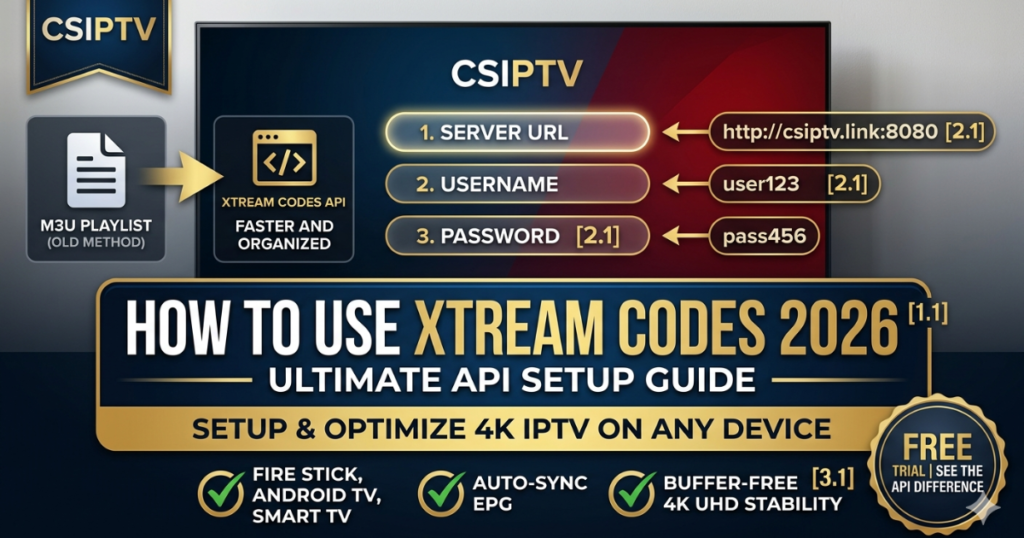
What are Xtream Codes and Why Should You Use Them?
At its core, an Xtream IPTV code isn’t just a random string of characters; it is a set of streamlined credentials that connect your player app directly to the CSIPTV high-speed servers. Unlike traditional M3U playlists, which require you to paste a massive text URL, the Xtream Codes API breaks your login into three simple, easy-to-manage parts.
This method is widely considered the “Gold Standard” for 2026 because it allows your device to fetch data in a structured format. This means your Live TV, Movies, and Series categories load instantly, and your EPG (Electronic Program Guide) stays perfectly synced without manual refreshing.
Step-by-Step: How to Setup Xtream Codes on Any Device
Whether you are using a Firestick 4K Setup or a Samsung Smart TV, the fundamental steps for how to use Xtream Codes remain consistent across all 2026 media players.
1. Secure Your Credentials
Upon purchasing a CSIPTV Subscription, you will receive three specific pieces of information:
- Server URL: (e.g.,
http://csiptv.link:8080) - Username: (Unique to your account)
- Password: (Securely generated)
2. Install a Compatible IPTV Player
The Xtream Codes API is supported by the world’s most popular apps. We recommend:
- TiviMate: The best for Android TV Boxes.
- IPTV Smarters Pro: The most versatile for mobile and Firestick.
- IBO Player: A top choice for LG and Samsung Smart TVs.
3. Entering the Data
- Open your chosen app and select “Add New User” or “Login with Xtream Codes API.”
- Any Name: Enter a label (e.g., “CSIPTV Home”).
- Username/Password: Carefully enter the details (they are case-sensitive!).
- URL: Type the server address exactly as provided, including the
http://and the port number (usually:8080or:25461). - Click “Add User” and wait about 30 seconds for your global library to populate.
Technical Benefits: Xtream Codes vs. M3U Playlist
When deciding how to use Xtream Codes, it helps to understand why this API-driven method outranks the older M3U format in every category.
| Feature | Xtream Codes API (Recommended) | M3U Playlist (Standard) |
| Setup Speed | Fast “Login & Play” | Manual URL Pasting |
| EPG Sync | Automatic & Real-time | Requires separate XML link |
| Data Usage | Efficient (Fetches only what’s needed) | Heavy (Parses entire text file) |
| VOD Features | Full Posters, Trailers & Cast Info | Basic Text Names Only |
| Stability | High (Direct Server Handshake) | Moderate (Link-based) |
Optimizing Xtream Codes for 4K Performance
To truly unlock the power of your Xtream Codes API connection, follow these professional optimization tips.
- Hardware Decoding: In your app settings under “Stream Format,” ensure you select MPEGTS (.ts) or HLS (.m3u8). This allows your TV’s GPU to handle the heavy lifting, preventing the CPU from lagging.
- Clear Cache Regularly: IPTV apps store temporary data to load images faster. If the app feels sluggish, go to your device settings and clear the app cache [2.1].
- Use External Players: If you experience “Audio Desync” on your Samsung TV, try switching the “Player Selection” to VLC or MX Player within the settings [2.1].
- Anti-Freeze Sync: Our Fix IPTV Buffering 2026 guide highlights that API connections are much better at maintaining a stable “handshake” with our anti-freeze nodes.
Common Xtream Codes Troubleshooting
- “Invalid Credentials” Error: 99% of the time, this is a typo. Double-check the Server URL for extra spaces or missing periods.
- “Playlist Error” or “No Channels”: Ensure your internet connection is active. For 4K UHD streaming, we recommend an Ethernet connection with at least 30 Mbps [3.1].
- Slow Loading during Matches: If you are trying to Stream the Champions League and it lags, check if your ISP is throttling. Using a VPN can often bypass these “silent” filters.
Expert Troubleshooting for Xtream Codes Login Errors
Even with the superior stability of the Xtream Codes API, local network issues or device configurations can sometimes cause a “Login Failed” message. Before you Contact Support, walk through these common technical fixes that resolve 95% of connectivity issues.
- DNS Conflicts: If your server URL won’t resolve, your ISP may be blocking the connection. Change your device DNS to 1.1.1.1 (Cloudflare) or 8.8.8.8 (Google) to bypass these local filters.
- Case Sensitivity: Xtream Codes are extremely sensitive. A capital “L” instead of a lowercase “l” in your password will result in a failed handshake with the CSIPTV nodes.
- Active VPN Interference: While we are an Anti-Throttle Provider, some low-quality VPNs block the specific ports used by Xtream Codes (like 8080). Try toggling your VPN off to test the connection.
- Device Memory Leaks: If the app hangs on “Downloading Channels,” your Firestick or Samsung TV may be out of RAM. Restart your device to clear the temporary system memory.
- Expired Subscription: Double-check your account status on our Pricing Page to ensure your plan hasn’t reached its end date.
2026 Premium Subscription Plans & API Packages
We offer various tiers of access to our global infrastructure. Every CSIPTV Plan includes full Xtream Codes API credentials, allowing you to bypass the limitations of old-fashioned M3U playlists.
| Plan Duration | Price | Simultaneous Connections | Best For |
| 1 Month | €14.99 | 1 Device | Testing 4K Stability |
| 3 Months | €25.99 | 2 Devices | Sports Seasons (NHL/UCL) |
| 6 Months | €35.99 | 3 Devices | Multi-Room Households |
| 12 Months | €39.99 | Unlimited API Access | Best Value for 2026 |
Advanced API Features: Beyond Simple Streaming
The reason CSIPTV is the world leader in 2026 is that our Xtream Codes API offers more than just a list of channels. It provides a fully interactive media suite that transforms your Android TV Box or Samsung Smart TV into a custom cinema.
Our business is dedicated to the philosophy of high-performance delivery. By using our API, you gain access to our “Smart Metadata” system. This means when you browse our 120,000+ VOD titles, you aren’t just seeing a file name; you are seeing high-resolution posters, IMDB ratings, cast lists, and even movie trailers. This level of Service Excellence is why we remain the preferred choice over competitors like VocoTV. Furthermore, our API supports “Multi-Screen” viewing, allowing you to Stream Champions League matches while monitoring other live sports scores on a single screen.
Get Your Premium Xtream Codes Today
At CSIPTV, we pride ourselves on being the Best International Provider for 2026. Our business is built on providing the most stable and feature-rich Xtream Codes in the industry.
| Plan | Price | Connection Type |
| 1 Month | €14.99 | Xtream API + M3U |
| 12 Months | €39.99 | Priority API Access |
Experience the API Difference
Don’t settle for the frustration of broken M3U links. Switch to the professional way of streaming and enjoy over 55,000 channels with the click of a button.
- Free Trial: Get your 24-Hour Xtream Codes and test the speed.
- Full Access: Secure your 12-Month Plan and get our 2026 configuration guide for free.
[GET MY XTREAM CODES LOGIN NOW]
Frequently Asked Questions (FAQs)
1. Can I use the same Xtream Codes on two different apps?
Yes, but not at the same time unless your Pricing Plan supports multiple connections. Using the same credentials on two devices simultaneously will result in a temporary security lockout.
2. Why is my EPG not showing up with Xtream Codes?
The Xtream Codes API fetches EPG data automatically. If it’s missing, go to your app settings and select “Refresh EPG” or “Clear EPG Cache.” Our servers provide a full 7-day guide for all Global Channels.
3. Is there a difference between the “Server URL” and “Portal URL”?
In the world of 2026 IPTV, they are essentially the same. For most apps like TiviMate or IPTV Smarters, you will use the Server URL provided in your activation email.
4. How often do the Xtream Codes update?
Your login credentials remain the same for the duration of your subscription. However, the content (Channels/VOD) updates in real-time every time you launch the app.
5. Do Xtream Codes work on iPhone and Mac?
Absolutely. Simply Download a compatible player like GSE Smart IPTV or vPlay and enter your CSIPTV credentials to start streaming.