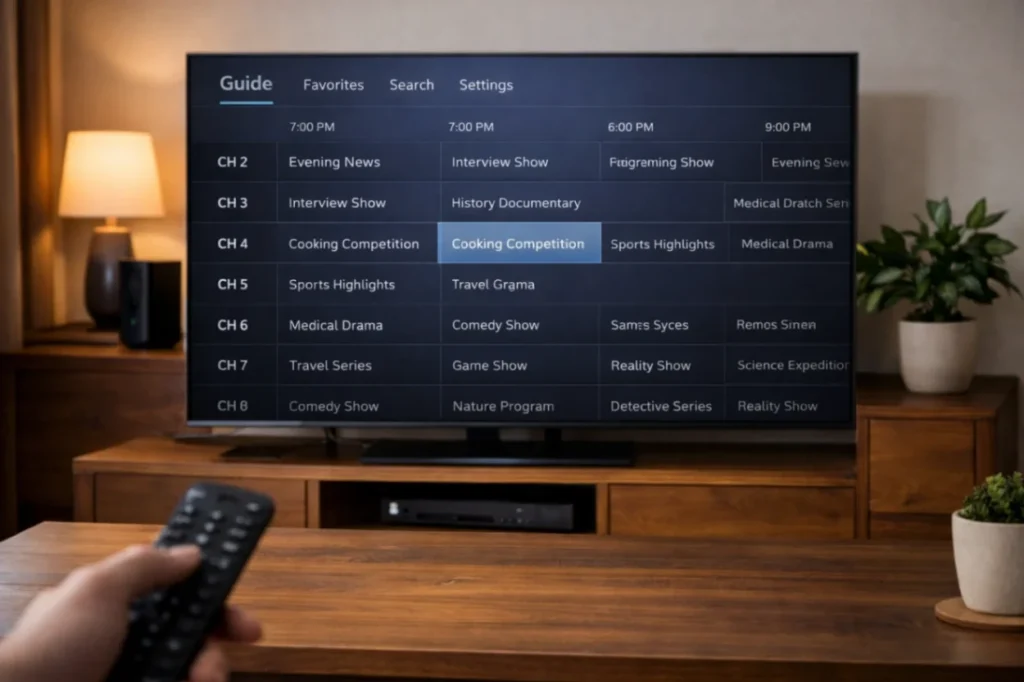
If you have ever asked what is EPG in IPTV, you are not alone. Many people see the term EPG during setup or inside a player app, but they are not fully sure what it does. EPG stands for Electronic Program Guide. In simple words, it is the schedule view that helps you see what is on now, what is coming next, and how to move through channels more comfortably.
For many users, EPG is one of the features that makes IPTV feel more complete and more premium. It is not only a technical extra. It improves daily usability, helps families find content faster, and makes live TV easier to enjoy.
What is EPG in IPTV in simple terms
When people ask what is EPG in IPTV, the easiest answer is this: it is the TV guide inside your player app. Instead of clicking channels one by one and guessing what is playing, the guide gives you structure. You can view current programs, upcoming shows, and in some cases extra details such as titles, time slots, and categories.
Without EPG, IPTV can feel less organized. With EPG, the service becomes easier to browse and easier to trust.
Why EPG matters for real users
- It saves time when browsing channels
- It makes live TV feel more familiar
- It improves the overall viewing experience
- It helps users discover upcoming shows
- It is useful for families who share one service
These are practical benefits, not just technical ones. Good navigation matters a lot when a service is used every day.
How EPG works in IPTV apps
Most IPTV apps import guide data from the service or from linked guide files. Once loaded, the player app shows channel names with schedule information. Some apps display a classic grid layout, while others offer a side list with current and next programs.
The exact design depends on the player app and the quality of the guide data. That is why one user may have a very smooth EPG experience while another sees only partial information.
What is the difference between EPG, replay, and catch-up?
EPG
EPG is mainly the program guide. It tells you what is playing and what is scheduled.
Replay
Replay usually means you can go back and watch previously aired content if your provider supports it.
Catch-up
Catch-up is similar to replay and often refers to the ability to watch recently aired programs after their live time has passed.
When asking what is EPG in IPTV, many people are really asking about this whole group of features. They work together, but they are not the same thing.
Why EPG improves user satisfaction
A good guide reduces friction. Users can make faster decisions, search less, and enjoy a more familiar TV experience. Instead of randomly opening channels, they can plan what to watch. This is especially useful for sports, entertainment, and family viewing.
Guide quality also affects how premium a service feels. When the interface looks organized and informative, the service feels stronger.
Common EPG problems users see
- No schedule data showing
- Guide loads slowly
- Channel names do not match the guide
- Time zone appears incorrect
- Only some categories show guide information
These issues do not always mean the service is broken. Sometimes the app needs more time to load data. In other cases, the player app may handle guide data differently from another app.
How to improve EPG performance
- Use a player app with strong guide support
- Allow time for the guide to load after first login
- Check your device time and time zone settings
- Keep the app updated
- Restart the app if the guide looks incomplete
Why EPG matters before buying an IPTV service
When users compare services, they often focus only on price or the number of channels. But navigation matters too. A service with guide support, clean categories, and replay features can feel much easier to use. That usually leads to better long-term satisfaction.
This is one reason why many users check not only the channel list but also the features included in the package. Guide support makes a big difference in real-life use.
EPG on different devices
EPG can look different depending on whether you use Firestick, Android TV, Smart TV, or a mobile device. A large television interface often makes the guide easier to read, while a small mobile screen may use a more compact layout. This is normal. The feature stays the same, but the design changes with the screen size.
For platform support and app behavior, official device resources like Android TV Help and Apple Support can be helpful.
How EPG supports replay and planning
One of the biggest strengths of EPG is planning. You can see what is starting soon, what already aired, and in some systems jump into replay or catch-up if the service supports it. This makes IPTV feel closer to a premium digital TV experience rather than just a simple channel list.
Can you use IPTV without EPG?
Yes, but the experience is often less comfortable. You can still watch content, but you lose the structure that helps you move through channels efficiently. For occasional users this may be fine. For daily users, EPG becomes much more important.
Final thoughts on what is EPG in IPTV
So, what is EPG in IPTV? It is the feature that brings order, clarity, and convenience to live TV. It helps users see what is on, what comes next, and in some cases connect with replay or catch-up features. A good guide can improve user satisfaction a lot because it makes the whole service easier to browse, easier to understand, and more enjoyable every day.
FAQ
Does EPG mean the same as replay?
No. EPG is the guide, while replay refers to watching content after it aired.
Why is my EPG empty after setup?
The guide may still be loading, the app may need a restart, or the provider may not supply complete guide data for every channel.
Is EPG important for sports and live events?
Yes. It helps users see event timing and browse channels more efficiently.
Do all IPTV apps show EPG the same way?
No. The design and guide quality can vary depending on the player app.
Can EPG improve the value of a subscription?
Yes. A strong guide can make the service feel much more organized and user-friendly.